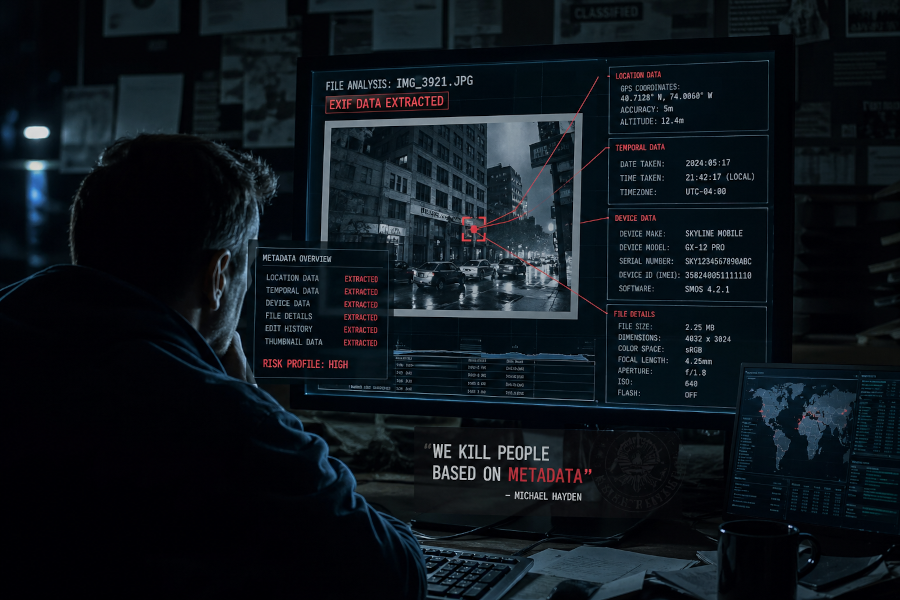
Every file you share is a little more talkative than you’d like.
That PDF contract has the name of every person who edited it, when, and on what machine. The photo you posted last weekend quietly broadcasts the GPS coordinates of where you took it. The Word doc a colleague forwarded to you might be carrying a macro that runs the moment you click “Enable Editing.” Spreadsheets can carry formulas that exfiltrate data. PDFs can carry JavaScript. Images can carry hidden payloads.
Most of the time, none of this matters. But sometimes it really does, and by the time you find out, the file is already in someone else’s inbox.
That’s the problem I built cleanthis.io to solve.
What it actually does
cleanthis.io is a free, browser-based file sanitizer. You drop in a file, it strips out everything dangerous or invisible, and you download a clean copy on the other side. No account, no email, no tracking.
Under the hood, it uses an approach called Content Disarm and Reconstruction (CDR). Traditional antivirus software works like a bouncer with a list of known troublemakers, it scans your file against a database of known threats and waves through anything it doesn’t recognize. CDR works differently: it assumes anything active in a file is suspicious by default, removes it, and rebuilds the file from just the visible content.
The mental model is closer to a customs checkpoint than a metal detector. You don’t get through with anything that isn’t on the approved list, even if nobody’s seen it before.
What’s hiding in your files
A quick tour of the things people don’t realize they’re sharing:
- Office docs can contain VBA macros, ActiveX controls, and OLE objects, all of which can execute code.
- Photos carry EXIF data: GPS, camera model, timestamps, sometimes even the serial number of the device.
- PDFs can embed JavaScript, auto-open actions, and entire other files as attachments.
- Spreadsheets are vulnerable to formula injection, where an innocent-looking cell pulls data from somewhere it shouldn’t.
- Images can hide encoded data via steganography, text or files tucked into the pixels themselves.
- Word documents keep a surprising amount of editing history and author info even after you “clean” them through the built-in tools.
If you’ve ever sent a document to a client and worried about what metadata you forgot to scrub, this is exactly that worry, automated.
How it works
Three steps. That’s the whole thing.
1. Get the file in. Drag and drop, or paste a share link. cleanthis.io knows how to fetch from Google Drive, Dropbox, OneDrive, SharePoint, and GitHub directly, no need to download a file just to upload it again. If a link needs authentication, you’ll get a clear message about why it didn’t work.
2. Pick a sanitization level.
- 🟢 Light: Just metadata. Strips GPS, author names, timestamps, and similar identifying info. Your file otherwise stays untouched.
- 🟡 Standard: The default. Removes macros, scripts, embedded objects, and all the other active content along with metadata.
- 🔴 Aggressive: Maximum paranoia. Converts Office files to PDF, images to PNG, and re-encodes everything from scratch. Use this when you genuinely don’t trust the source.
3. Download the clean file. You also get a report listing exactly what was removed, every macro, every metadata field, every embedded object. If you want the full breakdown, you can export it as CSV or JSON.
The original file is wiped from the server within 15 minutes using a 3-pass overwrite. Nothing lingers.
What gets removed, what stays
The golden rule: if you can see it, it stays. If it’s hidden or executable, it goes.
| Removed | Kept |
|---|---|
| VBA macros, ActiveX controls | All visible text and content |
| JavaScript, auto-open actions | Layout, formatting, fonts |
| Metadata (author, GPS, timestamps, camera info) | Images (re-encoded, clean) |
| Embedded attachments and OLE objects | Charts, tables, graphs |
| Script tags and event handlers | Audio and video content |
| EXIF data | Subtitle timing and text |
| Steganographic payloads | Visual appearance |
You should not be able to tell the difference between the original and the cleaned version by looking at it. That’s the whole point.
The format list is wide on purpose
cleanthis.io handles 60+ formats, because file sanitization is only useful if it covers whatever you happen to be holding:
- Documents — Word, Excel, PowerPoint, OpenDocument, RTF, CSV, Markdown
- PDFs — full sanitization, including script and attachment removal
- Images — JPG, PNG, GIF, BMP, TIFF, WebP, HEIC, AVIF
- Audio — MP3, M4A, OGG, FLAC, WAV, AAC, and more
- Video — MP4, WebM, MKV, MOV, AVI, WMV
- Web files — HTML, XML, JSON, YAML
- E-books — EPUB
- Subtitles — SRT, VTT, ASS, SSA
- Vector graphics — SVG, EPS
If you’ve got a format that isn’t on this list and you think it should be, let me know.
Privacy is the whole product
A file sanitizer that quietly logs your files would be missing the point, so cleanthis.io is built around not knowing anything about you:
- No account required for the web tool
- No email, no password, no tracking
- No analytics, no third-party scripts
- Files erased within 15 minutes, securely
- Nothing shared with anyone, ever
Beyond that, every upload is virus-scanned before processing, validated to make sure it’s actually the format it claims to be (renamed .exe files are a classic), and checked for compression bombs designed to crash whatever opens them. Processing happens in a sandbox so that anything genuinely malicious has nowhere to go.
Who this is for
Honestly, more people than you’d think.
Journalists and activists stripping metadata before publishing source documents. Lawyers and businesses cleaning files before they go to opposing counsel or external clients. Photographers who’d rather not broadcast their home address with every Instagram post. Security folks who want to look at a suspicious file with the dangerous parts already neutralized. Teachers and students scrubbing assignments. Developers who want to add file sanitization to their own apps without building it from scratch.
For that last group, there’s an API.
For developers
If you’re building something that accepts file uploads from users, you should probably be running them through a CDR pipeline. The API gives you the same sanitization the web tool uses:
- Anonymous accounts; sign up with nothing but a generated account number
- API keys for programmatic access
- Webhook callbacks when jobs complete
- Free during the beta
It’s a REST API, so you can integrate it in roughly a dozen lines of code in any language. Docs are on the site.https://cleanthis.io
Try it
Drop a file at cleanthis.io. No sign-up wall, no trial countdown, no upsell. The web tool is free, the API is free during beta, and the whole project can be self-hosted if you’d rather run your own instance.
Your files probably know too much about you. This makes them stop talking.